


07/08/2026
Blog
Measuring Power Use on EuroHPC Systems
By Bert Jorissen (University of Antwerp)
EuroHPC systems enable researchers to run large-scale simulations and data-intensive workloads. These computations, however, consume significant amounts of power. So how do you know whether you are using these systems efficiently, both in terms of performance and energy?
The new EPICURE Best Practice Guide on Power Consumption Measurements helps answer that question. Its main conclusion is simple: There is no universally best system or “greenest” configuration. To understand energy use, you must measure it for your own workloads. The guide compares GROMACS, CP2K, and NAMD simulations on CPU, GPU, and ARM nodes across multiple EuroHPC machines.
Energy usage: an unseen issue
Energy efficiency is an increasingly important aspect of HPC. Lowering the energy use of your calculations reduces both operational cost and the environmental impact of your research. As modern systems become larger and more powerful, their energy demand increases accordingly. Improving efficiency, therefore, has a direct effect on sustainability and costs.
Depending on the system you use, several tools can help you investigate power usage. You can query energy data directly through Slurm, or use site‑specific tools such as MERIC, EAR, CINEMON, or COUNTDOWN to gain more detailed insights.
Investigate scaling
Most users already benchmark their code to optimise runtime. A code that does not scale well across multiple nodes often performs best on a single node. This behaviour appears in several systems. Let’s take the GROMACS CPU tests on LUMI as an example. There, the increase in power consumption closely mirrors the loss in scaling efficiency.
By combining these effects into the net efficiency loss, we see that GROMACS maintains a constant trend. The higher power use of GROMACS is mainly due to reduced parallel efficiency. Improving the code’s efficiency, therefore, directly reduces the energy required to complete a calculation.
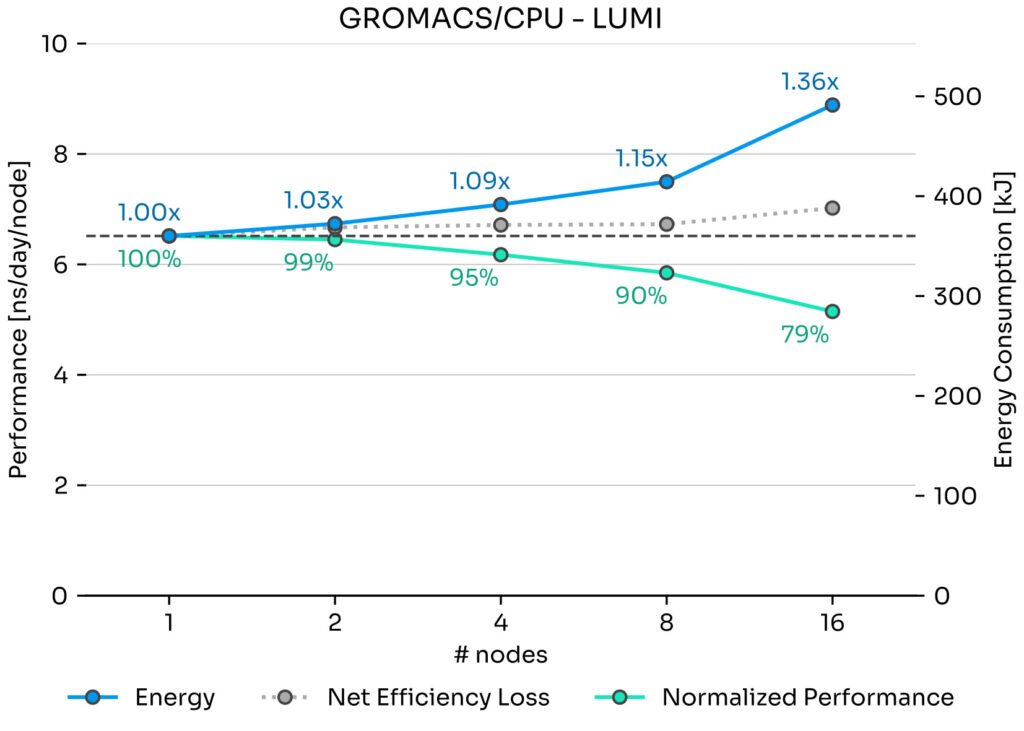
The normalized performance (green) and energy usage (blue) for GROMACS on LUMI-C, together with the net efficiency loss (grey)
Benchmark your code
Although fewer nodes generally result in more efficient runs, this is not always the case. Internal parallelisation strategies can cause certain codes to perform better on a different number of tasks or nodes than expected. NAMD is a good — or bad — example. It automatically determines how to distribute tasks across available resources.
As a result, on some systems NAMD achieves slightly better relative performance at higher node counts because it can use the assigned resources more effectively. This again highlights the importance of testing different configurations.
GPU vs CPU
Modern EuroHPC systems include large GPU partitions, offering major speed‑ups for many applications. However, GPUs are not always more energy‑efficient. Depending on the code, GPUs may deliver only a modest reduction in runtime while consuming significantly more energy. For example:
- – On Leonardo, GROMACS on GPU uses 3.72 times less energy than on CPU.
- – On LUMI, the same GPU run consumes 28% more energy than the CPU version.
This illustrates that the performance advantage of GPUs does not automatically translate into better energy efficiency.
Conclusion: test your code
The main message is clear: benchmark and analyse your code on the different machines available to you. Test your workloads on both NVIDIA and AMD GPUs, as well as on the corresponding CPU partitions.
Only by measuring runtime and energy consumption can you identify the configuration that provides the best balance between performance and power usage.
For a clearer understanding of power consumption and efficiency, you can consult the EPICURE Best Practice Guide directly.
It provides detailed benchmarks, methodologies and practical tools that can be applied to real workloads across different EuroHPC systems.